
Microsoft has released Application Guard for Office, a defensive technology that detains untrusted Office documents from accessing trusted resources on a user’s device. The new defensive service prevents malware or malicious files from penetrating a device’s operating system or application software, keeping the user’s perimeter secure from emerging cyberattacks. The Application Guard for Office will apply to MS Word, MS Excel, PowerPoint for Microsoft 365, and Windows 10 Enterprise.
Hardware Requirements to Install Application Guard for Office
- CPU: 64-bit, 4 cores (physical or virtual), virtualization extensions (Intel VT-x OR AMD-V), Core i5 equivalent or higher recommended
- Physical memory: 8-GB RAM
- Hard disk: 10 GB of free space on the system drive (SSD recommended)
Software Requirements
- Windows OS: Windows 10 Enterprise edition, Client Build version 2004 (20H1) build 19041 or later.
- Office application: Office Current Channel Build version 2011 16.0.13530.10000 or later.
- Update package: Windows 10 cumulative monthly security update KB4571756.
How to Enable Application Guard for Office?
- Download and install Windows 10 cumulative monthly security updates KB4571756.
- Select Microsoft Defender Application Guard under Windows Features and select OK. Enabling the Application Guard feature will prompt a system reboot. You can choose to reboot now or after step 3.
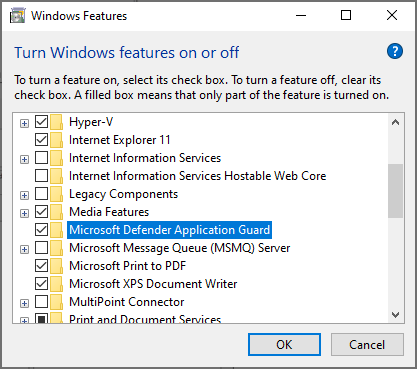
3. Search for Microsoft Defender Application Guard in Managed Mode, a group policy in Computer Configuration\Administrative Templates\Windows Components\Microsoft Defender Application Guard. Turn on this policy by setting the value under Options as 2 or 3, and then selecting OK or Apply.
4. Restart the system.
Application Guard for Office restricts untrusted documents to reach corporate resources, users’ intranets, identity, and arbitrary files on the computer. Microsoft said, “If a user tries to access a feature that has a dependency on such access — for example, inserting a picture from a local file on disk — the access will fail and produce a prompt like the following example. To enable an untrusted document to access trusted resources, users must remove Application Guard protection from the document.”
Related Story: Microsoft to Launch Enforcement Mode to Address Critical “Zerologon” Flaw